The Internet connects millions of people from different corners of the planet. This increases the need for multilingual websites for different countries and requires more effort from their owners. First, they have to translate the site into different languages. Second, they have to configure the system so that Google shows the content to the right users.
When it comes to SEO optimization, hreflang becomes essential. It is a vital function that supports search engines in accurately directing traffic.
Since hreflang implementation may be a bit tricky, you can use free tools to simplify the task. In this article, we’ll discuss how to use the GeoPlugin hreflang attribute as an example and provide some basic advice. Let’s dive in.

Table of Contents
Quick Explanation: What Is Hreflang?
Hreflang is an HTML attribute used to tell search engines which language and regional version of a page should appear for different users. It is typically implemented inside the tag in the page’s HTML.
For example: <link rel=”alternate” hreflang=”en” href=”https://example.com/en/” />
This tells search engines that the page is intended for English-speaking users. Hreflang helps prevent duplicate content issues and ensures users see the correct version of your website.
What Is Hreflang and Why Should You Use It?
Google introduced hreflang in 2011 to help website owners reach a relevant audience. Technically speaking, it is an HTML attribute in <link rel=”alternate”> tags. Its purpose is to indicate the language and region for a specific web resource to search engines.
In simple terms, it is a helpful option that acts as a translator for Google. It informs it of the text language on the website and users who should see it in search results. For example, if your content is in English, it looks like this: <link rel=”alternate” hreflang=”en” href=”https://example.com/en/” />.
Although hreflang does not directly influence rankings, it helps search engines show the correct language or regional version of a page. This improves user experience and can indirectly increase engagement and organic traffic. As a result, website owners get interested users, and Internet searchers get access to the content they need. Hreflang ensures that search engines provide the correct version of the site for each language group.
When should you use the hreflang attribute?
In fact, it will be useful for anyone working in the industry. However, it will make the biggest sense if you:
- Have multiple language versions of your site and want to avoid confusion.
- Strive to establish connections between similar pages in different languages.
- Focus on a specific region or language group and aim to attract relevant users.
Otherwise, Google may index your page incorrectly, and users will see your site in search results in a different language. This, in turn, will increase the risk of bounce rates and worsen conversion.
How to Implement Hreflang Step by Step
Implementing hreflang may seem complicated, but with a tag generator, it becomes a simple process. We’ll describe the process using the free tool from GeoPlugin as an example.
How to Use the GeoPlugin Hreflang Tag Generator Tool
This self referencing hreflang is easy to use, ideal for beginners, and requires no coding. It generates tags in the correct HTML format, ready for insertion into the <head> of your website.
To get completed tags, follow these steps:
- Go to https://www.geoplugin.com/free-tools/hreflang-generator.
- Prepare a list of URLs for your pages in different languages.
- Enter the URLs into the field; you can include a number of options at once.
- Select the necessary language from the drop-down list.
- Specify the country; this is optional, not mandatory.
- Click the Add Tag button.
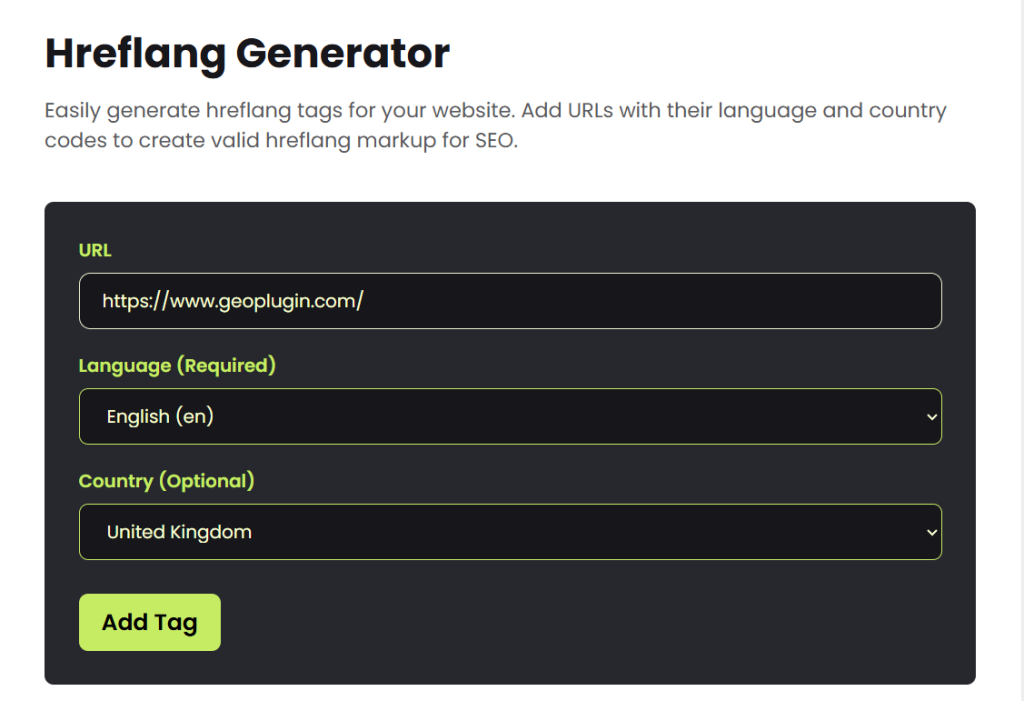
In a couple of moments, the tool will produce the HTML code. Simply copy and paste it into the header of the appropriate page. The main advantage of GeoPlugin’s hreflang attribut is that the entire process is semi-automated.
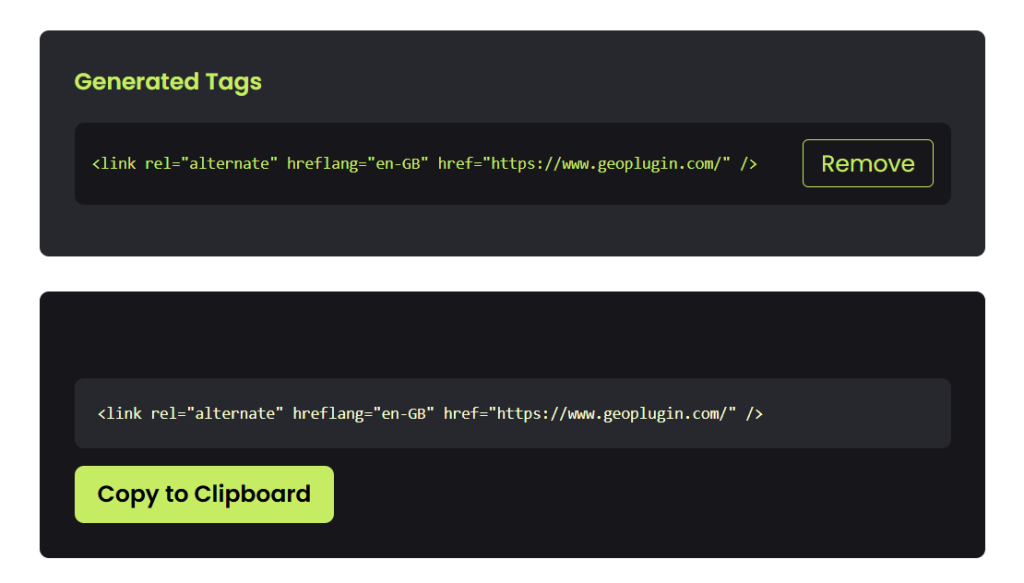
To put it another way, you can find the correct code without using ISO standards. Moreover you don’t have to worry about making mistakes when manually entering the code. The generator will do most of the work for you.
How to Add Tags to Your Website
After generating the code, paste it into the <head> section of each page, before the closing </head> tag. You can use page markup or HTML. If necessary, you can also turn to any free plugin to speed up the process even more.
Keep in mind that you need to add tags to all the necessary pages, not just the home ones. This will help you accurately target content to users who speak a particular language.

How Can Using Hreflang Tag Generator Improve Your Ranking?
The generator is more than just a code-writing tool. It is a quick way to make your website friendly to an international audience and improve your search rankings. Here’s how it can really help:
- Targeting by country and language: The right tags show the English version to English speakers, which greatly increases local relevance.
- Improved user experience: Visitors see content in their native language and stay on the site much longer.
- Increased targeted traffic: Search results show the site to users from specific regions, bringing in more of the target audience.
- Avoiding duplicate content issues: Google does not penalize identical content, but rewards a clear multilingual structure.
- Improved behavioral factors: Longer time on page and deeper browsing signal quality content to Google.
In short, update tags regularly when adding new languages or changing URLs. Then check the results in Google Search Console under “International Targeting.” This will enable you to monitor your website growth in global search results.
Common Hreflang Implementation Mistakes
Even small errors in hreflang implementation can prevent search engines from recognizing your multilingual structure.
Common mistakes include:
- Missing reciprocal tags – each page must reference the other language versions.
- Incorrect language codes – always use ISO language codes like “en”, “fr”, or “es”.
- Missing self-referencing hreflang – each page should include its own hreflang tag.
- Broken URLs – hreflang tags must point to valid pages.
Using a hreflang generator helps reduce these mistakes and ensures the tags follow correct syntax.
Some Extra Tips for Your Success
Well, you already know quite a lot. It’s time to move on and give you advice on how to get the most out of the approach:
- Always add self-referencing so that each page has its own hreflang tag, no matter what the language is.
- Use x-default to specify a universal version for everyone whose language does not match the others.
- Double-check the codes or use a generator to avoid mistakes in ISO worldwide abbreviations.
- Don’t ignore the mobile version and add tags everywhere to ensure that the page indexation is correct.
- Combine adding tags with geotargeting to target users from different addresses even more accurately.
If you avoid common mistakes and adopt a proven tool, your multilingual website will start working much more efficiently.
Conclusion
Hreflang implementation allows Google to correctly direct users to the appropriate language version of the site depending on their country. Using a simple generator, you can speed up the setup and create correct code without duplicates.
This directly improves relevance in local search, reduces bounce rates, and increases organic traffic from target regions. Start with the main pages, then move on to the others. Add tags and watch the results. Hreflang is one of the easiest ways to make a multilingual website searchable.
FAQ
Can I use hreflang tags without involving third-party resources?
Yes, you can. However, keep in mind that you must use standardized abbreviations to configure the output correctly. Also, be careful when entering the code. The simplest typo might erase your efforts. That’s why the tool generator makes sense.
Is GeoPlugin Hreflang Generator free?
Yes, the tool is completely free and has no restrictions on the number of tags. It is available online without registration.
What else can I use to achieve better results?
If you want to improve user targeting even further, you can use GeoPlugin services based on IP geolocation. With the help of their plugins, you can set up automatic redirects by country, display personalized content, and much more.